Skip to content

Live on the Chrome Web Store · version 0.12.0

Nyuchi Learning

See your whole class at once.

The Toddle Enhancement Extension puts every rubric criterion in its own column, exports results to Excel or CSV, and conceals student flags with one free switch on a shared screen. Nothing from Toddle leaves your browser.

What Nyuchi Learning makes

The open Bundu Education frameworks they build on are free to use, at bundu.org/education.

The same promise in every install

  • Runs only on Toddle
  • Nothing from Toddle leaves your browser
  • No account, no analytics, no tracking
  • Flag concealing free, always

How it works

Nothing from Toddle leaves your browser.

The extension reads what Toddle already shows you and redraws it on your screen. Here is everything it touches, and the only three things that ever go anywhere else.

Inside your browser

  1. Step 1: Toddle, in your tab

    You sign in to Toddle as usual. The extension runs on web.toddleapp.com and nowhere else.

  2. Step 2: The extension, on your machine

    It reads what Toddle already lets you see, through read-only queries and the session you are signed in with. It never asks for your password, and writes are blocked outright.

  3. Step 3: On your screen

    Per-criterion columns, the student sidebar, and an Excel or CSV file your browser saves. Student data is held in the tab's memory and never written to storage.

What crosses that line, and nothing else

  • Toddle's own servers

    Back to Toddle

    The queries go to Toddle with your own sign-in, as Toddle's page does. What comes back goes nowhere else.

  • Our licence server

    Only with a licence

    At most once a day, a request for a signed list of cancelled keys. It sends no key, no identifiers and no Toddle data. If it fails, your licence keeps working.

  • Adding your licence

    Only when you use your licence link

    Once, the code from the one-time link in your licence email, and nothing else, to our licence server, which sends back your key. It is then checked on your machine like any key.

  • The feedback form

    Only when you press Send

    What you typed and the version number, to our feedback form, processed by Formspree. Nothing from Toddle is included. A Toddle compatibility report goes the same way, only when you send it or switch that on: what changed in Toddle's page, masked, with no student data.

No account, no analytics, no tracking and no remote code. Nothing it reads from Toddle is sent anywhere but back to Toddle. Version 0.12.0, as on the Chrome Web Store.

Toddle Enhancement Extension

The whole gradebook, at a glance.

The gradebook Toddle gives you, with the views it is missing, and a way to project it.

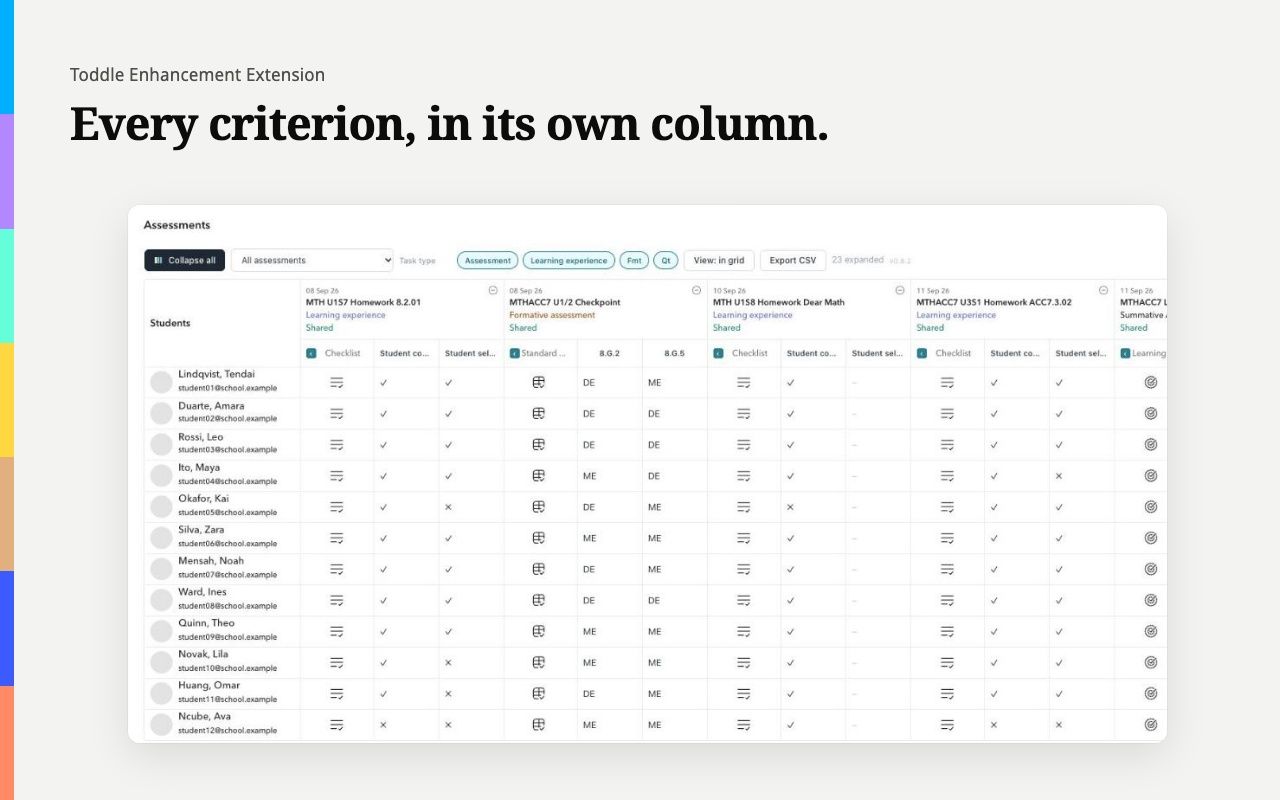
The Toddle gradebook with each assessment's checklist, standards and learning goals expanded into a column per criterion, every student's result in its own cell. Test data.
Per-criterion columns, with a licence. Test data; names covered.

In Toddle today

  • An assessment tool is one icon per student; you open a side panel to read each result.
  • Student flags are on screen when the gradebook goes on a projector or into a screen share.
  • To see who a class's primary teacher is, you open the class.
  • When Toddle changes its page, a feature that relies on it can stop working without a word.

With the extension

  • One column per standard, criterion or checklist item, every student's result visible at once, and the lot in one Excel or CSV file.
  • One free switch conceals what flags say, across Toddle, and stays as you left it.
  • The primary teacher beside every class, so you know who to ask.
  • A compatibility check on the licence page says which feature a Toddle change affects, and pauses it cleanly.

Built by Nyuchi Learning

Two products, ready to use today.

Both live on this site. The training and the open frameworks they grew from live with the rest of the Nyuchi and Bundu family.

Classroom tools · Nyuchi Web Services

Live

Toddle Enhancement Extension

A Chrome extension for the Toddle gradebook. It expands every rubric into per-criterion columns, exports the lot to Excel or CSV, and conceals student flags with one free switch when you share your screen.

Language learning · Part of Mukoko by Nyuchi

Live

Mukoko Lingo

Language training for schools, businesses and government. Shona, Ndebele, English and Chinese (Swahili in beta), five phrases a day, with Shamwari, an AI tutor that adapts to each learner. Set the work and see each learner's progress.

Foundation initiative

Bundu Education

Open, evidence-based frameworks for K-12 digital campuses, digital literacy, and support process. Free to copy, adapt, and share. The Foundation publishes; anyone can implement.

Explore the frameworks

Commercial product

Nyuchi Learning

Cohort-based and self-paced training in software, AI, and digital skills. Localised for Africa with offline study packs. Implementation services for organisations adopting the Bundu Education frameworks.

See the programme

Pricing

Free to start. One price for a whole school.

Concealing student flags is free, always: it protects a student. A licence pays for the time saving.

Free

Free

Any teacher, for as long as they like.

  • Conceal student flags across Toddle with one switch
  • My classes on the Toddle home page
Add to Chrome

Individual

US$5 per year

One teacher.

  • Every assessment tool expanded into per-criterion columns
  • Excel or CSV export
  • The student sidebar, with where they are now and today's timetable
  • The class view, a class's teachers to email at once, and message buttons into Toddle's chat
  • Primary teacher names, and the Attendance dashboard's Now line
Buy — US$5 per year

For a school

Organisation

US$149.99 per year

A school. One key for your email domain: anyone signed in to Toddle with an address there is covered.

  • Everything in Individual, for your whole staff
  • Managed rollout through the Google Admin console, with the licence set by IT through Chrome policy
  • Invoice, and a named contact for support
Buy — US$149.99 per year

Checkout is through Buy Me a Coffee. Usually within a minute, you get an email with a one-time link to your licence, never the key itself: open it in Chrome and click Add it to Chrome. A full refund within 30 days of purchase, for any reason related to the product.

Upgrades, refunds and the small print

For whoever has to sign this off

Built to be checked, not taken on trust.

Every claim here is in the privacy policy and the security page, and the extension's own data schema lists every field it reads.

  • Runs only on Toddle

    It has no access to any other website.

  • Reads, never writes

    Every request is a read. Writes are blocked outright.

  • No tracking

    No account, no analytics and no remote code.

  • Licence checked locally

    Activating a key contacts nothing and works offline.

On the Chrome Web Store: rated 5.0 out of 5 (1 rating), with 27 users, as of 29 October 2026.

Questions

Frequently asked.

Short answers to what schools ask us most.

Does it send student data anywhere?

No. It reads what Toddle already lets you see, with the session you are signed in with, and sends nothing it reads anywhere but back to Toddle. There is no account, no analytics and no tracking. The only outside connections are a daily check for cancelled licence keys, which carries no key and no data; the feedback form when you press Send, which also carries a Toddle compatibility report (masked, with no student data) when you send one or switch that on; and, when you use the one-time link from your licence email, one request that exchanges it for your key. How it works.

What is free, and what does a licence add?

Concealing student flags and the My classes filter are free, and always will be. A licence adds the per-criterion columns, Excel or CSV export, the student sidebar, the class view, primary teacher names and the Attendance dashboard's details. See the prices.

Can our IT team install it for every teacher?

Yes. It is on the Chrome Web Store, so IT can force-install it from the Google Admin console by its ID, or through Group Policy, Intune or a macOS profile. An organisation licence is one key for your school's email domain, and IT sets it for every teacher through Chrome policy, so nobody pastes a key. Deploying it.

What if Toddle changes?

Toddle does not publish an API for this, so a Toddle release can break a feature, usually by renaming something. The extension checks for that in your own Toddle tab: when Toddle has changed something, the licence page says which feature is affected, and that feature pauses cleanly rather than breaking the gradebook. Send us the report in one click (it carries no student data) and we will chase it.

Can we get a refund?

A full refund within 30 days of purchase, for any reason related to the product. Ask by emailing support@nyuchi.com from the address you bought with, or through Buy Me a Coffee.

Do you run training, or help with the Bundu Education frameworks?

Yes. Cohort-based and self-paced training in software, AI and digital skills, and implementation help for organisations adopting the frameworks, is at nyuchi.com/learning.

Try it on your next gradebook.

Install it free in one click. When you want the columns and the export, a licence is US$5 per year for a teacher, or one key for your whole school.